
Most cyber incidents and IT failures are not caused by sophisticated attacks. They come from small, overlooked decisions that quietly create risk over time.
For business owners and employees, these issues often go unnoticed until something breaks, data is lost, or operations stop. The challenge is not just avoiding obvious mistakes. It is identifying the hidden ones that feel normal but create real exposure.
Below is a practical breakdown of the most common tech mistakes businesses make today, along with how to recognize and fix them before they become expensive problems.
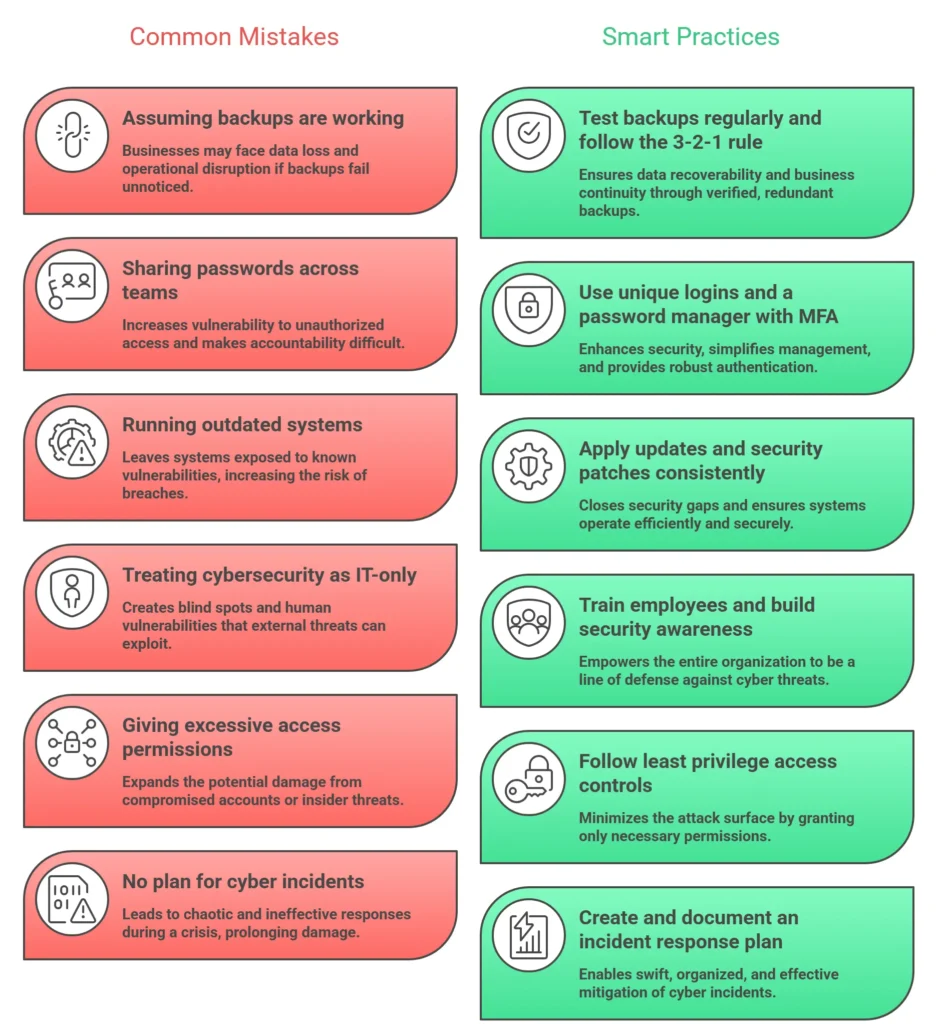
1. Assuming Backups Exist (or Actually Work)
Many businesses believe they have backups in place. In reality, they often have one of the following:
- Backups that have not run in months
- Files syncing to cloud storage, but not true backups
- No way to restore data quickly
- Partial backups that miss critical systems
This becomes a serious issue during ransomware attacks, hardware failure, or accidental deletion.
A reliable backup strategy follows the 3-2-1 rule:
- 3 copies of your data
- 2 different storage types
- 1 offsite or offline copy
For more guidance, see Cybersecurity and Infrastructure Security Agency (CISA).
What to do: Test your backups regularly. If you cannot restore data within a few hours, your backup system is not ready.
2. Sharing Passwords Across Teams
Shared logins are still extremely common in small and mid-sized businesses. It often starts as a convenience and becomes a long-term security issue.
Common examples:
- One login for an entire team
- Passwords stored in spreadsheets
- Credentials sent through email or chat
This creates several problems:
- No accountability for actions
- Higher risk of credential theft
- Difficulty removing access when employees leave
Modern attacks rely heavily on compromised credentials rather than hacking systems directly.
Best practices are outlined by NIST (National Institute of Standards and Technology).
What to do: Use a password manager and enable multi-factor authentication wherever possible.
3. Running Outdated Systems and Software
Outdated systems are one of the easiest entry points for attackers.
- Old operating systems
- Unsupported software
- Delayed security patches
- Legacy hardware still in production
Many breaches exploit vulnerabilities that already have available fixes.
Track vulnerabilities via National Vulnerability Database.
What to do: Set automatic updates where possible and create a regular patching schedule.
4. Treating Cybersecurity as an “IT Problem”
Cybersecurity is not just an IT issue.
- Most attacks start with human behavior
- Phishing targets employees
- Social engineering bypasses defenses
See trends from the FBI Internet Crime Complaint Center (IC3).
What to do: Train employees regularly. Even short sessions reduce risk.
5. No Clear Access Control
As businesses grow, access permissions often expand without review.
- Access to unnecessary systems
- Too many admin privileges
- Exposure to sensitive data
What to do: Apply the principle of least privilege and review access quarterly.
6. Ignoring Email-Based Threats
Email remains the most exploited attack vector.
- Phishing
- Invoice fraud
- Vendor impersonation
- Executive impersonation
Insights available from Microsoft Security.
What to do: Use email filtering, train staff, and verify financial requests.
7. No Incident Response Plan
Most businesses lack a clear plan when something goes wrong.
- Delayed response
- Confusion
- Poor communication
Frameworks available via SANS Institute.
What to do: Define who to contact, what to isolate, and how to communicate.
8. Overlooking Network and Device Visibility
Many businesses do not know:
- What devices are connected
- What software is installed
- Where data is stored
What to do: Maintain an updated inventory and monitor activity.
9. Relying on “Set It and Forget It” Technology
Technology requires ongoing management.
- Security tools need updates
- Backups need monitoring
- Configurations drift
What to do: Review systems regularly and ensure active management.
10. Underestimating Downtime and Recovery Impact
Downtime costs more than most businesses expect:
- Lost revenue
- Employee downtime
- Customer loss
- Reputation damage
What to do: Define recovery time expectations and plan accordingly.
Key Takeaways
- Small mistakes create big risks
- Backups, updates, and access control are essential
- Human behavior is a major factor
- Preparation matters as much as prevention
Frequently Asked Questions
What is the most common tech mistake businesses make?
Assuming their systems are protected when they are not, especially with untested backups and outdated software.
Why are shared passwords dangerous?
They eliminate accountability and increase the risk of unauthorized access.
How often should systems be updated?
Security updates should be applied as soon as possible, with at least monthly reviews.
Do small businesses get targeted?
Yes. They are often easier targets due to fewer security controls.
What is the fastest way to improve cybersecurity?
- Enable MFA
- Use a password manager
- Train employees
- Test backups
How long does recovery take?
Anywhere from days to months depending on severity and preparation.
Do small businesses need an incident response plan?
Yes. Even a basic plan significantly reduces damage.
Final Thoughts
Most business technology issues are preventable. The problem is not a lack of tools, but a lack of awareness and consistency.
By addressing these common mistakes early, businesses can reduce risk, avoid downtime, and operate more confidently.
ITGuys provides managed IT and cybersecurity services to help businesses stay secure, operational, and prepared for modern threats.
Contact ITGuys Today!
Denver Office – Local IT Support & Consulting
National Services – Managed IT Solutions Across the U.S.
Recent Comments